Top 5 UI Trends 2026
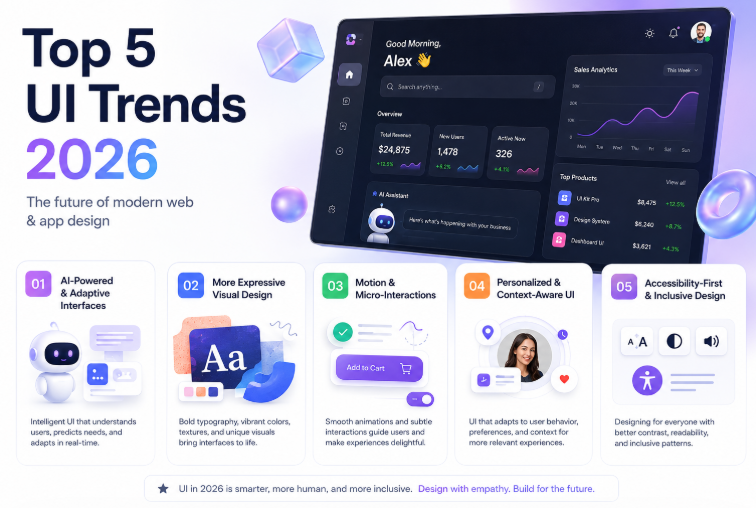
Top 5 UI Trends in 2026: The Future of Modern Web & App Design
Meta Description: Discover the top 5 UI design trends of 2026, from AI-powered interfaces and adaptive experiences to expressive motion, tactile visuals, and accessible design.
User interface design is changing faster than ever. In 2026, a modern interface is no longer judged only by how attractive it looks. Users expect products to understand context, respond intelligently, feel fast, work across devices, and remain easy to use.
Artificial intelligence is playing a major role in this transformation. At the same time, designers are moving away from overly generic, polished interfaces and experimenting with richer visuals, motion, personalization, and more human-centered experiences.
Recent industry research and product developments show how closely design and development are becoming connected. Figma's 2026 research, for example, reports that 41% of designers participate in development, up from 21% previously, while developers participating in design increased from 44% to 60%.
So, what should designers and developers watch in 2026?
Here are five of the biggest UI trends shaping modern websites and applications this year.
1. AI-Powered and Adaptive Interfaces
Perhaps the biggest UI trend of 2026 is the transition from static interfaces to intelligent interfaces.
Traditional UI gives every user essentially the same experience. AI-powered UI can adapt based on the user's intent, behavior, preferences, and context.
Instead of simply clicking through multiple menus, users may increasingly be able to describe what they want in natural language.
For example:
"Show me the best-selling products under $100."
An intelligent interface could automatically create the appropriate filters, retrieve the products, organize the results, and present them in a useful format.
This is sometimes referred to as generative UI—interfaces that can dynamically create or modify parts of the experience depending on what the user needs.
What does AI-powered UI look like?
Common examples include:
AI assistants integrated into dashboards
Dynamic search interfaces
Personalized recommendations
Automatically generated forms
Conversational navigation
Smart data visualization
Context-aware menus
AI-generated content blocks
Personalized onboarding experiences
The important change is that AI isn't simply being added as a chatbot in the corner of a website.
Instead, AI is becoming part of the interface itself.
Research into generative UI is also exploring how interfaces can dynamically adapt for accessibility, including screen-reader-friendly structures and conversational guidance.
Why it matters
The goal isn't to replace good UX with AI.
It's to reduce unnecessary interaction.
A well-designed AI interface should help users reach their goal with fewer steps while still providing clear controls, feedback, and human oversight.
2. More Expressive Visual Design
For years, minimalism dominated digital product design.
Clean layouts, white backgrounds, subtle shadows, rounded cards, and simple typography became the standard.
Minimalism isn't disappearing in 2026—but designers are increasingly looking for ways to make interfaces feel more distinctive.
This is leading to more expressive and tactile visual design.
Current design discussions are highlighting texture, warmth, expressive typography, illustration, motion, and more human-looking visual elements as alternatives to overly uniform digital aesthetics.
What we're seeing
Expect to see more:
Bold typography
Large editorial headlines
Textured backgrounds
Grain and subtle visual noise
Organic shapes
3D elements
Layered compositions
Strong color combinations
Hand-drawn illustrations
Character-based branding
Editorial-style layouts
The objective is simple:
Make digital products feel less generic.
When thousands of websites use similar component libraries and AI-generated layouts, visual personality becomes an important competitive advantage.
But don't overdo it
Expressive design doesn't mean adding random gradients, animations, and effects everywhere.
The best interfaces still have a strong visual hierarchy.
Use expressive elements to support:
Brand identity
Content hierarchy
Emotional connection
Product storytelling
User attention
A beautiful interface that makes navigation confusing is still bad UI.
3. Motion Becomes Part of the Experience
Animation used to be considered an optional visual enhancement.
In 2026, motion is increasingly becoming part of the interaction language of digital products.
Small animations can tell users what just happened, where something came from, and what they should do next.
For example, when a user:
Opens a menu
Adds an item to a cart
Changes a setting
Completes a form
Moves between pages
Expands a card
Deletes an item
A subtle animation can make the transition easier to understand.
Micro-interactions
One of the most useful applications of motion is the micro-interaction.
Examples include:
Button hover effects
Loading animations
Animated toggles
Progress indicators
Toast notifications
Smooth page transitions
Scroll-based effects
Interactive cards
These small details can make an application feel significantly more polished.
AI is making motion easier to create
Design tools are also moving toward AI-assisted motion workflows.
At Config 2026, Figma introduced AI-assisted motion capabilities alongside code layers, shader effects, and other expressive canvas features.
That means creating sophisticated interactive visuals is becoming more accessible to designers who don't specialize in animation.
The golden rule of motion
Animation should communicate, not distract.
If an animation slows the user down, makes navigation confusing, or causes accessibility problems, remove it.
Good motion feels natural.
Users notice bad motion immediately.
4. Personalization and Context-Aware UI
The "one interface for everyone" approach is gradually becoming less effective.
In 2026, interfaces are becoming more personalized and context-aware.
Imagine opening a project-management application in the morning.
Instead of showing exactly the same dashboard every day, the interface could prioritize:
Today's tasks
Upcoming deadlines
Recent projects
Frequently used tools
Important notifications
Current team activity
The interface becomes more useful because it understands context.
Personalization can happen at different levels
Content personalization
Different users see different content based on their interests or activity.
Navigation personalization
Frequently used features become easier to access.
Layout personalization
Users can rearrange dashboards, widgets, or panels.
Behavioral personalization
The application learns how users interact with it and adjusts recommendations accordingly.
Context matters
Personalization shouldn't mean secretly changing everything.
Users need predictability.
A good personalized interface should still maintain:
Consistent navigation
Familiar interaction patterns
Clear settings
User control
Transparency
AI systems are increasingly moving toward context-aware experiences that understand user intent rather than simply responding to isolated commands.
5. Accessibility-First and Inclusive UI
One of the most important UI trends of 2026 isn't flashy at all.
It's accessibility.
A modern interface should work for as many people as possible—including users with visual, auditory, motor, cognitive, or other accessibility needs.
Accessibility is increasingly becoming part of the design process rather than something developers check at the end.
Important accessibility practices
Modern interfaces should consider:
Keyboard navigation
Screen-reader compatibility
Sufficient color contrast
Readable typography
Clear focus states
Descriptive labels
Alternative text
Reduced-motion preferences
Large enough touch targets
Logical information hierarchy
Plain and understandable language
This becomes even more important as AI-generated interfaces become more common.
Research on generative interfaces has highlighted risks including inaccessible output, unclear information, semantic errors, and the need for human oversight—especially in high-impact situations.
Accessibility is good UX
There's a common misconception that accessibility is only about supporting users with disabilities.
In reality, accessible design often improves the experience for everyone.
For example:
Large readable text helps people using mobile devices.
Clear labels help users who are unfamiliar with an application.
Captions help people watching videos in noisy environments.
Keyboard navigation helps power users work faster.
Good accessibility is simply good product design.
Bonus Trend: Design and Development Are Converging
Although this isn't one of the five visual UI trends, it's one of the biggest changes happening behind the scenes.
The traditional workflow looked something like this:
Designer → Figma → Developer → Code → Testing
The 2026 workflow is becoming much more interconnected.
Designers are working with code.
Developers are participating in design.
AI can generate prototypes.
Design tools can interact with code.
Design systems can be shared between teams.
Figma's 2026 research found that 41% of designers participate in development, while 60% of developers now participate in design work.
AI-assisted design-to-code systems are also becoming an active area of research, although current systems can still struggle with responsive layouts and maintainable production code.
This means the future UI designer may need to understand more about:
HTML
CSS
JavaScript
Design systems
Components
Accessibility
Responsive design
AI tools
Prototyping
And developers may need stronger visual and UX skills.
How to Apply These UI Trends in Your Next Project
You don't need to redesign your entire website around every trend.
Instead, choose the trends that actually solve problems for your users.
For a business website
Focus on:
Strong typography
Expressive branding
Subtle motion
Accessibility
Personalized content
For an SaaS application
Focus on:
AI-assisted workflows
Context-aware dashboards
Personalization
Design systems
Micro-interactions
For an e-commerce website
Focus on:
Personalized recommendations
Smart search
Interactive product previews
Clear product hierarchy
Fast mobile experiences
For a mobile application
Focus on:
Touch-friendly controls
Motion
Context-aware navigation
Accessibility
Personalized experiences
Final Thoughts
UI design in 2026 isn't simply about making interfaces look modern.
It's about making them smarter, more expressive, more personal, and easier to use.
The five trends worth watching are:
AI-powered and adaptive interfaces
More expressive visual design
Motion and micro-interactions
Personalized and context-aware UI
Accessibility-first design
The most successful products won't necessarily use the most trends.
They'll use the right trends for their users.
AI can generate a screen in seconds, but good UI still requires human judgment. Figma's 2026 design research similarly emphasizes that AI can accelerate workflows while human craft remains important to the quality of the final experience.
So, if you're designing a website or application in 2026, don't ask only:
"How can I make this interface look modern?"
Ask:
"How can I make this interface feel useful, intelligent, trustworthy, accessible, and unmistakably human?"
That is where the future of UI design is heading.